
Last updated: 17 May 2026 · Originally published February 2026 · By James Wright
The best smart plug for UK homes in 2026 is the TP-Link Tapo P110 (~£12–18) — the only sub-£20 plug with real-time energy monitoring, Alexa and Google Home support, and a reliable scheduling app requiring no hub. For Apple HomeKit users, the Eve Energy (Matter) (~£35–50) is the standout premium pick: Matter + Thread support, 100% local processing, and no cloud account required. For homes needing cross-platform Apple/Alexa/Google compatibility at a mid-range price, the Meross Matter Smart Plug (~£18–25) works natively across all three ecosystems out of the box.
We compared five of the most popular smart plugs available in the UK — the Tapo P100, Tapo P110, Eve Energy (Matter), Meross MSS310, and Kasa KP115 — testing energy monitoring accuracy, app quality, smart home compatibility, and real-world value for UK households. Prices correct as of March 2026.
⚡ Which smart plug should you buy?
| Product | Our Pick | Price |
|---|---|---|
| TP-Link Tapo P110 | ⭐ Best VALUE | Check Price → |
| Best Smart Thermostats UK 2026 | ⭐ Best PREMIUM | Check Price → |
| Check Prices on Amazon UK | ⭐ Best BUDGET | Check Price → |
Quick answer: The best smart plug for most UK homes in 2026 is the TP-Link Tapo P110 (~£12–18) — genuine energy monitoring, excellent app, works with Alexa and Google Home. For Apple HomeKit users, the Eve Energy (~£35–50) is the premium Thread-enabled pick. Need cross-platform compatibility? The Best Smart Thermostats UK 2026 Smart Radiator Valves UK 2026: Tado vs Meross vs Evelow noopener sponsored”>Meross MSS310 (~£18–25) works with Alexa, Google AND Apple Home.
Smart plugs are the cheapest way to start a smart home in the UK — no electrician needed, setup in under 10 minutes. They’re a great pick if you’re starting a smart home on a budget. With energy bills still high in 2026, a plug with energy monitoring can pay for itself within weeks by exposing standby waste. We compare 5 models side-by-side on real-world UK performance.
How to Set Up Smart Home on Budget 2026 UK Smart Radiator Valves UK 2026: Tado vs Meross vs Eve Best Smart Thermostats UK 2026Also see: EV Home Charger Installation Cost UK 2026: Full Price Guidek.co.uk/best-smart-thermostats-uk/”>Best Smart Thermostats UK · Energy Monitoring Systems UK · Smart Home Starter Kit Under £200 · 7 Gadgets Under £50 That Cut Bills
This article contains affiliate links. If you buy through our links, we may earn a small commission at no extra cost to you. See our affiliate disclosure.
In this guide, I’ll compare five of the best-known options for UK buyers: TP-Link Tapo P110, Eve Energy, Meross MSS310, Hive Active Plug, and Amazon Smart Plug. I’ll cover who each model is best for, where each one fits in a real home, and what to avoid before buying.
⚡ In a rush?
Skip straight to our editor's top pick for the best UK smart plugs in 2026 — the rest of the roundup is below.
Quick Comparison Table: Best Smart Plugs UK 2026
| Smart Plug | UK Price | Energy Monitoring | Matter / HomeKit | Works With |
|---|---|---|---|---|
| Tapo P100 (2-pack) | Check Amazon | ❌ No | ❌ No | Alexa, Google Home, Tapo |
| Tapo P110 | Check Amazon | ✅ Yes | ❌ No | Alexa, Google Home, Tapo |
| Eve Energy (Matter) | Check Amazon | ✅ Yes | ✅ Yes (Matter + Thread) | Apple HomeKit, Alexa, Google, SmartThings |
| Meross Smart Plug (Matter) | Check Amazon | ✅ Yes | ✅ Yes (Matter) | Apple HomeKit, Alexa, Google, SmartThings |
| Kasa KP115 | Check Amazon | ✅ Yes | ❌ No | Alexa, Google Home, SmartThings, Kasa |
Prices fluctuate on Amazon — always check the links below for the current UK price.
1. TP-Link Tapo P100 (2-Pack) — Best Budget Smart Plug UK
The Tapo P100 is the smart plug most UK households start with — and for good reason. It’s cheap, compact, reliable, and dead easy to set up. If you just want to turn a lamp or fan on and off remotely, the P100 does the job without asking you to think too hard about it.
The 2-pack makes it excellent value. You get two plugs, both work with Alexa and Google Home, both support scheduling and timers, and both have a compact form factor that doesn’t block the adjacent socket — a genuine annoyance that many budget plugs get wrong.
What it doesn’t have is energy monitoring. If you want to track how much electricity your appliances are using, you’ll need to step up to the P110. The P100 is purely a remote on/off switch with scheduling — which, for most people’s lamps and fans, is genuinely all they need.
Tapo P100 Pros & Cons
The Tapo P100’s main advantage over pricier alternatives is its 2-pack value — you get two reliable smart plugs for under the price of a single budget competitor, making it the cheapest way to add voice control to lamps and appliances, though it sacrifices energy monitoring entirely.
✅ Pros
• Excellent value as a 2-pack
• Compact — doesn’t block adjacent sockets
• Fast, reliable Wi-Fi connection
• Clean, intuitive Tapo app
• Easy setup (no hub needed)
• Works with Alexa and Google Home
• Away mode for security
❌ Cons
• No energy monitoring
• No Matter or HomeKit support
• Requires Tapo cloud account
• Tapo ecosystem only (no local control)
Best for: Anyone who wants simple smart control at the lowest possible price, without needing energy monitoring.

2. TP-Link Tapo P110 — Best Value Energy Monitoring Plug
The Tapo P110 is the P100’s smarter sibling — and honestly, it’s one of the best smart plugs you can buy in the UK right now if you care about energy usage. It adds real-time and historical energy monitoring for only a few pounds more than the P100.
With UK energy bills still painful, knowing that your old electric heater is quietly chewing through £40 a month is genuinely useful. The Tapo app shows you real-time power consumption, daily/monthly totals, and lets you set power-off thresholds. It’s surprisingly capable for something at this price point.
Like the P100, the P110 works with Alexa and Google Home, supports scheduling, and has the compact design that doesn’t block neighbouring sockets. The Tapo app is clean and well-maintained. Available as a single, 2-pack, or 4-pack — the 4-pack brings the per-unit cost right down.
The main caveat: no Matter, no HomeKit, no local control. If you’re deep in the Apple ecosystem or planning to move to a Matter-based setup, the P110 will eventually feel limiting. But for most UK homes running Alexa or Google Home, it’s the sweet spot.
Tapo P110 Pros & Cons
The Tapo P110’s standout advantage over other budget plugs is real-time energy monitoring at a price that typically commands a £35+ premium from competing brands — making it the most cost-effective way to track electricity usage per device in a UK home in 2026.
✅ Pros
• Real-time and historical energy monitoring
• Excellent value — especially in multi-packs
• Compact design
• Strong Tapo app with usage graphs
• Works with Alexa and Google Home
• Scheduling, timers, away mode
• Power-off threshold alerts
❌ Cons
• No Matter or HomeKit support
• Cloud-dependent (Tapo account required)
• No local control out of the box
• Single socket only
Best for: UK households who want energy monitoring at a sensible price and primarily use Alexa or Google Home.

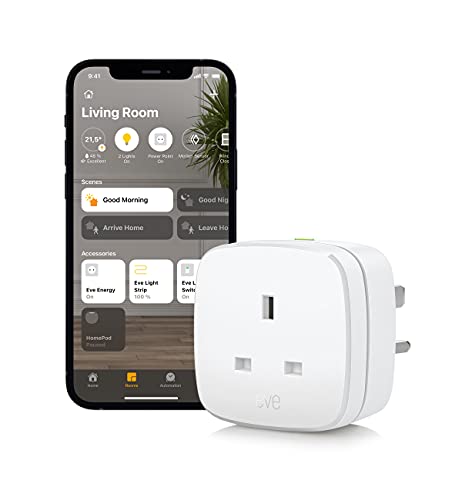
3. Eve Energy (Matter) — Best Smart Plug for Apple HomeKit Users
The Eve Energy (Matter) is in a different category to the Tapo plugs — it’s a premium smart plug built for people who take their smart home seriously. It’s the only plug on this list that supports Matter over Thread, giving it unmatched compatibility and a more robust wireless connection than Wi-Fi-only alternatives.
If you have an Apple HomePod, iPhone, or iPad, the Eve Energy integrates beautifully into Apple HomeKit with full automations, Siri voice control, and the Eve app. It also works with Alexa, Google Home, and SmartThings — making it genuinely future-proof as Matter becomes the new smart home standard.
Energy monitoring is built in, tracking real-time wattage and cumulative kWh usage. The 100% local processing — no Eve cloud, no registration, no data sent to third-party servers — is a genuine differentiator for privacy-conscious buyers.
The price is higher than the Tapo options, but you’re paying for Thread support, Matter certification, Apple HomeKit compatibility, and local privacy. For iPhone households that want the best smart plug available in the UK, this is it.
Eve Energy (Matter) Pros & Cons
The Eve Energy’s unique advantage over every other plug on this list is its Matter + Thread combination — the only option with 100% local processing (no cloud account, no data leaving your home), Apple HomeKit native support, and compatibility with all major smart home platforms as Matter becomes the new standard.
✅ Pros
• Matter + Thread support — most future-proof
• Works with ALL major ecosystems
• Apple HomeKit native support
• Energy monitoring included
• 100% local — no cloud dependency
• Full privacy (no registration, no tracking)
• TÜV safety certified
• Excellent build quality
❌ Cons
• More expensive than Tapo alternatives
• Thread requires a Thread Border Router (Apple HomePod, Eero, etc.)
• Overkill if you don’t use HomeKit
• Single plug only
Best for: Apple HomeKit users, privacy-conscious buyers, and anyone building a long-term Matter-based smart home.
4. Meross Smart Plug (Matter, Energy Monitoring) — Best Cross-Platform Option
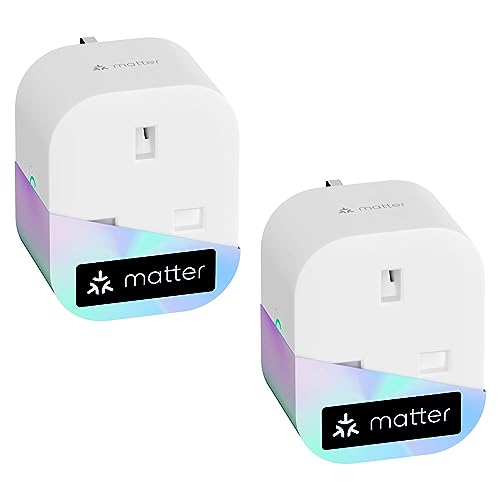
Meross has quietly become one of the best smart home brands most UK buyers haven’t heard of. Their Matter Smart Plug with Energy Monitoring is a compelling alternative that bridges the gap between the affordable Tapo range and the premium Eve Energy.
Like the Eve Energy, it supports Matter — meaning it works natively with Apple HomeKit, Alexa, Google Home, and SmartThings without needing a separate bridge or hub. Unlike the Eve, it doesn’t use Thread (it’s standard Wi-Fi Matter), but for most homes that’s not a practical issue.
Energy monitoring is included, the app is solid, and the plug itself is compact. The 2-pack offers good value for a Matter-enabled device. Setup is genuinely simple — scan a QR code in your preferred ecosystem app and you’re done.
The Meross app is functional but not quite as polished as Tapo’s or Eve’s. Customer support can be slow. But if you want Matter compatibility and energy monitoring without paying Eve Energy prices, this is the most affordable way to get there.
Meross Smart Plug Pros & Cons
The Meross Matter Smart Plug’s key advantage is Matter compatibility at a price well below the Eve Energy — the most affordable way to get Apple HomeKit support combined with energy monitoring for UK homes running a mix of Android and iOS devices.
✅ Pros
• Matter support — works with all major ecosystems
• Apple HomeKit compatible
• Energy monitoring included
• More affordable than Eve Energy
• Available in multi-packs
• Compact design
• No hub required
❌ Cons
• No Thread support (Wi-Fi Matter only)
• App less polished than Tapo or Eve
• Less brand recognition — harder to find reviews
• Customer support can be slow
Best for: Mixed smart home households who need Apple HomeKit compatibility with energy monitoring at a mid-range price.
5. TP-Link Kasa KP115 — Best for SmartThings & IFTTT Power Users
The Kasa KP115 is TP-Link’s other smart plug range — separate from Tapo, with a slightly different ecosystem focus. While the Tapo range prioritises simplicity and the Tapo app, the Kasa range integrates more deeply with SmartThings and IFTTT, making it popular with more advanced smart home users.
Energy monitoring is included, the plug is compact and slim, and the Kasa app provides real-time power consumption with historical data. It works with Alexa, Google Home, SmartThings, and IFTTT — giving you more integration options than the Tapo range, particularly if you use Samsung appliances or want complex automations.
It doesn’t support Matter or HomeKit. It’s also priced higher than the equivalent Tapo P110. For most UK households, the Tapo P110 offers better value unless you specifically need SmartThings integration or the Kasa ecosystem’s IFTTT support.
Kasa KP115 Pros & Cons
The Kasa KP115’s main advantage over the equivalent Tapo P110 is its deeper Samsung SmartThings and IFTTT integration — a genuine improvement for smart home power users running complex automations, though the higher per-plug cost makes it poor value for anyone outside the SmartThings ecosystem.
✅ Pros
• Energy monitoring with real-time data
• SmartThings and IFTTT support
• Slim, compact design
• Works with Alexa and Google Home
• Strong integration options for power users
• Reliable TP-Link build quality
❌ Cons
• No Matter or HomeKit support
• More expensive than Tapo P110
• Kasa and Tapo apps are separate (confusing if you mix brands)
• Cloud-dependent
Best for: SmartThings users and IFTTT power users who want deep integration beyond the Tapo ecosystem.

Which Smart Plug Should You Buy? A UK Decision Guide
Here’s the honest answer broken down by situation:
👉 Just want the cheapest smart plug that works? → Tapo P100 (2-pack)
If your goal is simply to turn a lamp, fan, or phone charger on and off remotely, the Tapo P100 2-pack is the best value buy on this list. You get two plugs, Alexa and Google Home support, and the excellent Tapo app — all for a very low price. Don’t overthink it.
👉 Want to track your energy bills? → Tapo P110
The P110 adds proper energy monitoring for a modest price premium. With UK electricity costs at around 24p/kWh, knowing exactly what’s running your bill up is genuinely useful — especially on older appliances, electric heaters, or EV chargers. Buy it in a 4-pack for the best price per unit.
👉 Have Apple devices and want the best smart home experience? → Eve Energy (Matter)
If you’re in the Apple ecosystem — iPhone, HomePod, iPad — the Eve Energy is the right choice. It’s the only Matter + Thread plug on this list, giving you the fastest response times, best reliability, and full HomeKit integration. It also works with Alexa and Google Home if your household is mixed. Yes, it costs more — but you’re buying future-proofing.
👉 Want Matter + HomeKit without paying Eve prices? → Meross (Matter)
The Meross Matter Smart Plug with Energy Monitoring hits a sweet spot: Matter compatibility, Apple HomeKit support, energy monitoring, and a lower price than Eve. No Thread support, but for most homes that won’t matter. Buy the 2-pack for better value.
👉 Use Samsung SmartThings or IFTTT? → Kasa KP115
The KP115 is the pick for SmartThings-heavy setups or people who rely on IFTTT for complex automations. The deeper SmartThings integration is genuinely better than the Tapo range here. For everyone else, though, the Tapo P110 is better value.
FAQ: Best Smart Plugs UK 2026
What is the best smart plug in the UK for 2026?
For most UK households, the Tapo P110 is the best smart plug in 2026. It combines reliable Wi-Fi connectivity, real-time energy monitoring, excellent app support, and competitive pricing — particularly in the 4-pack. If you have Apple HomeKit, upgrade to the Eve Energy (Matter) instead.
Is the Tapo P100 or P110 better?
The Tapo P110 is the better choice for most buyers — the energy monitoring upgrade costs only a few pounds more and adds real-time electricity tracking that can pay for itself within weeks by revealing standby waste. The P100 is only the better pick if you specifically need two plugs at the lowest possible price and have no interest in tracking energy usage.
Does Eve Energy work with Alexa and Google Home?
Yes. The Eve Energy (Matter) works with Apple HomeKit, Amazon Alexa, Google Home, and Samsung SmartThings — all via the Matter standard. You don’t need a separate bridge or hub. It’s one of the most cross-compatible smart plugs available in the UK.
What is Matter and do I need it?
Matter is the universal smart home standard backed by Apple, Amazon, Google, and Samsung — and if you use Apple HomeKit or plan to future-proof your smart home, Matter-compatible smart plugs like the Eve Energy and Meross are worth the premium over standard Wi-Fi plugs. Matter devices work across all major platforms without separate apps or bridges, which matters most for HomeKit users. If you only use Alexa or Google Home, standard Wi-Fi plugs like the Tapo P110 are perfectly fine and significantly cheaper.
Can smart plugs actually save money on energy bills?
Yes — a smart plug with energy monitoring can save £30–80 per year on a typical UK electricity bill by identifying energy-hungry appliances and eliminating standby waste through scheduling. Smart plugs are among the most cost-effective devices to cut energy bills in any UK home: first, by revealing which appliances cost far more than expected; second, by automatically turning off TVs, gaming consoles, and chargers overnight. At current UK electricity prices (around 24p/kWh), even modest changes add up — read more on how to cut your energy bills across your whole home.
Do smart plugs work without the internet?
Most UK smart plugs require cloud connectivity — including all Tapo and Kasa models — so remote control and app features stop working if your internet goes down (though scheduled timers stored on the device continue to run). The Eve Energy (Matter) is the standout exception: it processes everything locally over your home network, so it continues to function fully even without internet access — making it the best choice for privacy-conscious buyers or homes with unreliable broadband.
Is the Meross smart plug any good?
Yes — the Meross Matter Smart Plug is a solid choice, especially if you want Apple HomeKit compatibility at a price below the Eve Energy. It supports Matter, includes energy monitoring, works without a hub, and is available in multi-packs. The app is functional rather than exceptional, but for everyday use it’s perfectly capable.
Our Verdict: Which Smart Plug Should You Buy?
The TP-Link Tapo P110 is the best smart plug for most UK homes in 2026. At under £20, it delivers real-time energy monitoring, reliable Wi-Fi connectivity, Alexa and Google Home support, and a well-maintained app — a combination no other plug matches at this price point. Buy it in a 4-pack for the best per-unit cost.
Choose the Tapo P110 if: you use Alexa or Google Home, want to track electricity usage per appliance, and want the best-value energy-monitoring smart plug in the UK. At current electricity prices (~24p/kWh), identifying a single energy-hungry appliance can pay for the plug within weeks.
Choose the Tapo P100 (2-pack) if: you just want remote on/off control at the lowest possible price and don’t need energy monitoring. Two plugs for less than one P110 — ideal for scheduling lamps, fans, and phone chargers.
Choose the Eve Energy (Matter) if: you use Apple HomeKit with a HomePod or Apple TV, want Matter + Thread future-proofing, and value complete local processing with no cloud account required. The premium price buys genuine ecosystem depth and the best long-term compatibility.
Choose the Meross Matter Smart Plug if: you need Apple HomeKit compatibility at a price below the Eve Energy. Matter support means it works natively with Alexa, Google, and Apple Home without any bridge — and energy monitoring is included.
Choose the Kasa KP115 if: you use Samsung SmartThings or rely on IFTTT for complex automations. The deeper SmartThings integration is genuinely better than the Tapo range here, though it costs more per plug.
Skip smart plugs if: you plan to use them with high-draw appliances like kettles or electric panel heaters above 2.3kW — all plugs on this list are rated to 13A/2.3kW maximum. Pair your plugs with smart thermostats for complete energy control.
Concerned about electrical safety? Read our full smart plug safety guide covering UK regulations, BS 1363 standards, and which brands to trust.
New related guide
Smart Home UK Team - UK smart home enthusiasts who test, review and compare products. Independent. Honest. No sponsored placements.